 Ez Sidebar
Ver.4.0.2016031101 for Mozilla Firefox
Ez Sidebar
Ver.4.0.2016031101 for Mozilla Firefox
What's this? ...abstract
This provides the undocked (floating) Sidebar. You can place it to your favorites position. (The undocked Sidebar can collapse/expand itself automatically with mouseover.)
- if you use Mozilla/Netscape 7, install Ver.2.2 (Sidebar Window) please.
- If you only want to use user-defined panels and the undockability isn't needed, you can choose another extension, WebBar.
Similar Extensions
- How to show/hide the sidebar by one keyboard shortcut? Any toolbar button to switch sidebar panels?
- All-in-One Sidebar provides many features including them.
- How to open my favorite web pages into the Sidebar?
- The "Web Panel" feature of Firefox itself can do it. In the property dialog of bookmarks, turn the checkbox "Load this bookmark in the sidebar" on.
- How to open Sidebar outside the window? (I don't want overloaded extensions.)
- OutSidebar can do it. It expands the browser window automatically when the Sidebar is shown.
- I want only a feature to switch sidebar panels quickly!
- SwitchPanel does it. It appends a context menu switching panels, to the sidebar header.
Download Links to XPI packages
If you see any problem, see FAQ at first. If there is no solution, post a report to the issue tracker on the GitHub please.
Old Versions
- ver.3.0.3020030824
- ver.2.2 (Sidebar Window) for Netscape 7 & Mozilla : Document
Including Language Packs
Released version includes following language packs:
- English (en-US)
- Japanese (ja-JP)
Versions older than 3.2.2009110201 are inlude following language packs:
- Polish (pl-PL, by lenrock)
- Español (España) (es-ES, by Proyecto NAVE)
- French (Français) (fr-FR, by Jean-Bernard Marcon)
- Chinese (Simplified) (zh-CN, by George C. Tsoi)
Other Languages (Complete Packages include the extension body)
Features & Screenshots This package provides following features.
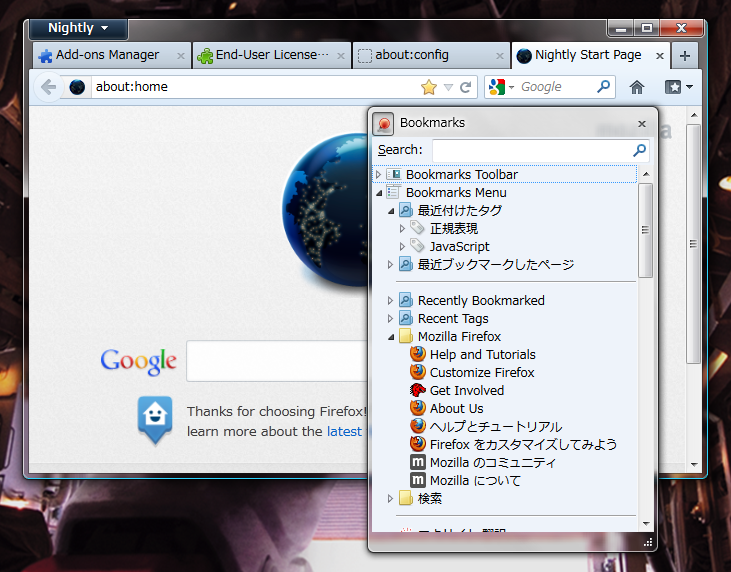 After you installed this addon, the Sidebar will be undocked from the browser window.
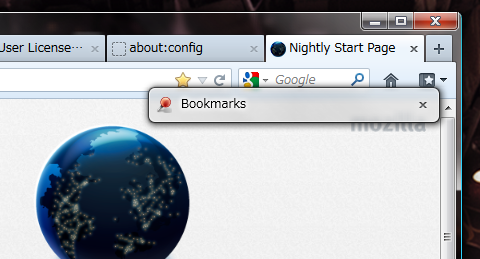 You can collapse / expand undocked sidebar with double-click. Moreover, if you uncheck the button top-left position in the Sidebar, Sidebar will be collapsed and expand automatically when you point on the Sidebar.
Documents
- Introduction of Ez Sidebar & Sidebar Window (Japanese)
- This is an archive of the document introducing this extension, for the XUL contest in the Mozilla.Party.jp 5.0. It explains technical information about 3.2.2009110201 and older versions.
History There is the updating history and the list of known problems.
Known problems on 3.2.2009110201 and olders
- Some panels will not work.
- When the sidebar window is always raised, other windows of Mozilla are placed in the back of other applications. This is a bug of Mozilla for win32.
History
- 4.0.2016031101
- Works on Nightly 48.0a1.
- Fixed: Suppress "sidebar.contentDocument is undefined" error on the initial showing.
- Modified: "jar" archive is no longer included.
- 4.0.2012122902
- Improved: Floating sidebar is updated asynchronously based on MutationObserver.
- 4.0.2012122901
- Works on Nightly 20.0a1.
- Drop support for Firefox 9 and older versions.
- 4.0.2012040801
- Fixed: Don't hide the floating Sidebar itself when a tooltip in the Sidebar panel is hidden.
- 4.0.2012040701
- Rewrite totally for Firefox 4 and later.
- Re-design for undocking of the Sidebar.
- Drop other features (user-defined Sidebar panels and the toolbar button). Instead, All-in-One Sidebar provides those features.
- 3.2.2009110201
- Works on Firefox 3.6 and Trunk.
- 3.1.2008052801
- Fixed: New panels can be added in undocked sidebar window.
- 3.1.2008052701
- Fixed: Initial dialog to confirm adding the toolbar button is shown correctly in Mac OS X.
- 3.1.2008040701
- Works on Firefox 3 beta5.
- 3.1.2007030901
- Fixed: Autoscroll is disabled for bookmarks and some panels in undocked Sidebar correctly.
- Fixed: Some errors disappeared.
- 3.1.2006011301
- Fixed: Empty navigation-bar doesn't show initializing dialog anymore.
- 3.1.20051205
- Fixed: Browser window can be closed correctly with the undocked sidebar.
- Fixed: Broken browser after closing the undocked sidebar disappeared.
- 3.1.20051105
- Improved: This extension confirms that a custom button should or shouldn't be inserted to the navigation toolbar.
- Modified: Uninstallation button disappeared.
- 3.1.20050905
- Modified: Now the Sidebar always reloads the panel even if it is closed with user-defined panel.
- Improved: Now the released package includes following langauge packs: Polish (pl-PL, by lenrock), Espaテアol (Espaテアa) (es-ES, by Proyecto NAVE), French (Franテァais) (fr-FR, by Jean-Bernard Marcon), and Chinese (Simplified) (zh-CN, by George C. Tsoi).
- 3.1.20050819
- Fixed: Broken context menu in the undocked Sidebar, on Firefox with Gecko 1.8, disappeared. (maybe)
- Fixed: Firefox can work correctly. The fatal error disappeared.
- Fixed: Works on Firefox builds with Gecko 1.8 correctly. (maybe)
- 3.1.20050729
- Fixed: Works completely with All-In-One Sidebar. (maybe)
- Fixed: Works correctly even if it is installed after installation of the All-In-One Sidebar 0.4.2. (Now, Ez Sidebar stops toggling operations about the Sidebar, until the Ez Sidebar itself is completely initialized.)
- 3.1.20050727
- Fixed: Last state of the Sidebar can be restored on every startup correctly.
- Improved: Now this extension can work with the All-In-One Sidebar.
- 3.1.20050713
- Fixed: Works correctly on Deer Park Alpha2.
- 3.1.20050625
- Fixed: Initalizing error disappeared, it was on the next startup of the Firefox 1.1 after closing with user-defined Sidebar panel.
- 3.1.20050620
- Fixed: Built-in panels of the Sidebar (by extensions) can access to the browser window correctly.
- 3.1.20050616
- Fixed: Undocked Sidebar will be closed correctly if the shortcut key for the current panel is pressed on the undocked Sidebar window.
- 3.1.20050518
- Fixed: Collision with some Sidebar extensions (ex. Optimoz Tewaks) disappeared.
- 3.1.20050419
- Fixed: Undocked Sidebar works correctly.
- 3.1.20050418
- Modified: Codes to access content area are rewritten securely.
- 3.1.20050410
- Fixed: Works on Firefox 1.0.3 RC builds correctly (maybe).
- 3.1.20050129
- Fixed: An fatal error about getting chrome URL of the default browser in the lately Firefox disappeared.
- Fixed: User-defined panels are reloaded correctly when you switch the active panel from the built-in to the user-defined.
- 3.1.20050115
- Fixed: Auto-collapsed sidebar remembers its size when restored form minimized.
- Fixed: Links in user-defined panels are shown as visited correctly for lately Nightly Builds.
- 3.1.20041105
- Fixed: Service is initialized and destroyed correctly.
- Fixed: Incorrect toggling of the Sidebar, synchronized to Print Preview, is disappeared.
- 3.1.20041030
- Improved: Page icons for userdefined panels are available.
- 3.1.20041026
- Fixed: Fatal error on startup disappeared. It was caused by codes from Rewind/Fastforward Buttons.
- Fixed: Undocked Sidebar keep itself closed on the next startup when you close Sidebar before the main window, even if you set Sidebar to be closed synchronized with the main window.
- 3.1.20041018
- Improved: Auto-minimize of undocked Sidebar is available.
- Improved: You can hide Sidebar on every startup automatically.
- Improved: Sidebar behavior is customizable from the configuration dialog.
- Fixed: Docked Sidebar is hidden correctly on the startup.
- 3.1.20040924
- Fixed: The fatal error on initializing Sidebar in browser window disappeared.
- 3.1.20040923
- Fixed: Errors on initializing and destructing disappeared.
- 3.1.20040911
- Improved: New shorcuts: Alt-PageUp and Alt-PageDown are available to switch Sidebar panels.
- 3.1.20040906
- Fixed: User-defined Sidebar panels are listed in the Sidemar menu correctly. (This problem only appeared in some platforms.)
- 3.1.20040824
- Improved: Drop-down list to load selected sidebar-panel directly is available on the toolbar button.
- Fixed: Unexpected popping up of drop-down list disappeared.
- Improved: Drag-and-drop operations for the drop-down list on the toolbar button are available.
- 3.1.20040726
- Fixed: Closing undocked Sidebar with no browser window doesn't open new browser instance anymore.
- 3.1.20040716
- Improved: The title of the selected panel is shown in the title bar.
- 3.1.20040423
- Fixed: Links have been shown as "visited" correctly even if you switch panel from a built-in to an user-defined.
- Modified: On Mac OS, "alyways raised" undocked-sidebar has been disabled.
- 3.1.20040413
- Fixed: The problem of unavailable browser-window which appears when the Sidebar is undocked, has been disappeared on Mac OS X. (maybe)
- 3.1.20040411
- Improved: Panels have been added and removed without confirming if you wish.
- Improved: Progress meter for Sidebar panels has been available.
- Fixed: Newly added panels have been loaded correctly.
- Modified: Style rules for the "Dock/Undock" button have been rewritten for lately Firefox.
- 3.1.20040409
- Improved: References to the content window have been redefined with a custom "getter" in sidebar panels.
- 3.1.20040408
- Fixed: Undocked Sidebar has disappeared correctly when you dock the Sidebar to the browser.
- 3.1.20040127
- Fixed: Broken appearance of toolbar buttons have been corrected.
- 3.1.20031229
- Fixed: A typo in the Japanese language pack has been corrected.
- Fixed: File-creating operation for the data file has been optimized.
- 3.1.20031224
- Fixed: Compatibility problem for old data file has been fixed.
- Fixed: Browser windows opened infinitely, after you close the undocked Sidebar, have disappeared.
- Fixed: The last command has been saved correctly.
- Fixed: Collapsing of undocked Sidebar has worked correctly.
- 3.1.20031125
- Modified: Original implementation to rebuild UI from RDF datasources, against the crash problem on the lately Mozilla Trunk after 2003/10, has been available.
- Improved: Operations while loading user-defined sidebar panels have been available, like the main content area.
- Fixed: Middle-click and the context menu have been available in the undocked sidebar, completely.
- Fixed: Internal "charset" option has been available for the loading from the undocked sidebar.
- 3.0.20030824
- Improved: New type "Web Panels" in Mozilla Firebird has been supported.
- Improved: "about:config" and other "about" URIs have been available for the Sidebar.
- 3.0.20030804
- Improved: Normal clicks in webpages have been loaded in the browser, not in the Sidebar.
- 3.0.20030803
- Modified: Auto-collapse Sidebar has worked when the sidebar get or lost focus.
- Fixed: Crash problem when the Sidebar is docked has been fixed.
- Fixed: Visited links have been parsed correctly.
- Fixed: Setting dialog has worked correctly.
- Fixed: Conflicting with Web Panels has disappeared.
- 3.0.20030730
- Fixed: Status of the check, "Auto-Collapse Sidebar" has been loaded correctly.
- Improved: Auto-collapse has collapse Sidebar when the window lost focus.
- Fixed: Duplicated Sidebar has disappeared.
- Improved: A new feature, "Auto-Close Sidebar by Browser" has been available.
- 3.0.20030724
- Released as "Ver.3.0" for Mozilla Firebird.
Old logs are available in the page for old versions.